


Complete Guide to Migrating Your eCommerce Platform to a Headless Architecture
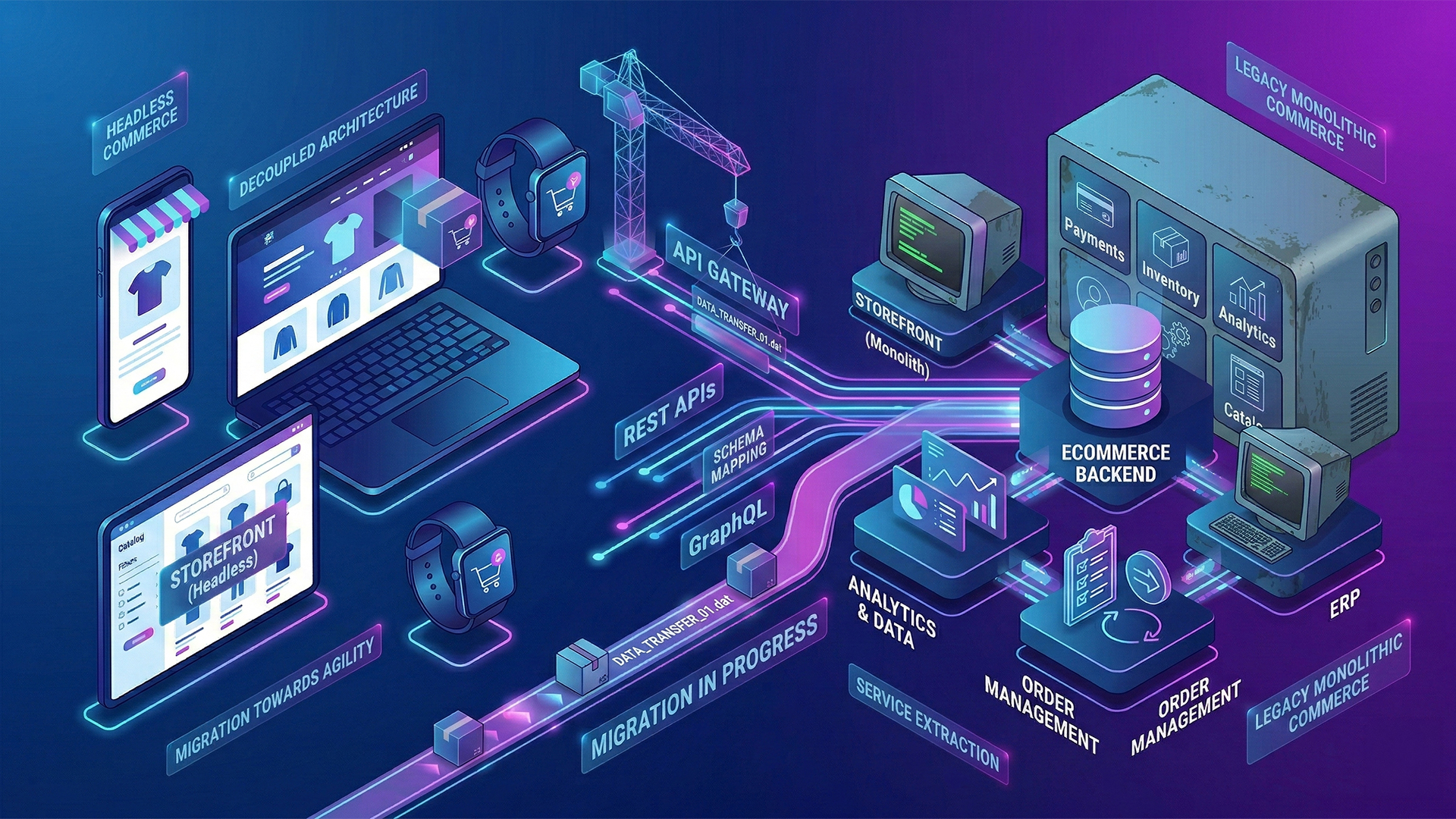
Your ecommerce platform is the backbone of your digital operation. But if each new feature takes months to implement, if updates put site stability at risk, or if you can't integrate modern tools without redesigning everything, your current architecture has probably become a brake on your growth.
The migration to a headless architecture isn't just a technological trend: it's a strategic decision that can transform the speed, flexibility and competitiveness of your business. This guide takes you step by step through the process.
What exactly is a headless architecture?
On a traditional (monolithic) platform, the frontend (what the customer sees) and the backend (the business logic, inventory, payments) are combined in a single system. Any change in the user experience requires touching the backend, and vice versa.
In a headless architecture, these two layers separate and communicate through APIs. This means that you can completely redesign the customer experience without affecting business logic, and you can update the commerce engine without breaking the frontend. The result: innovation cycles up to 3 times faster and load times between 40% and 60% faster.
How do you know if your company needs to migrate?
Not all companies need a headless architecture. But there are clear signs that your current platform is limiting your growth:
- Slow development speed: Implementing a checkout change or adding a promotion takes weeks instead of days.
- Poor mobile experience: Your site doesn't offer a native mobile experience and customizations are limited.
- Complex integrations: Connecting your ecommerce with an ERP, OMS, CRM or marketing tool becomes a costly project.
- Performance issues: Your site becomes slow during traffic peaks such as Hot Sale, Buen Fin or seasonal campaigns.
- Provider Dependency: You're tied to the limitations of your platform and each customization requires complicated alternative solutions.
If you identify two or more of these signs, it's time to evaluate a migration.
The 5 Steps to a Successful Migration
Step 1: Technical and Business Audit
Before migrating, you need to understand what you have. This includes mapping all current integrations (payment gateways, ERP, CRM, logistics), documenting existing customizations, evaluating the state of your data (products, customers, historical orders) and identifying the pain points of your technical and business team. A professional Health Check Assessment can reveal hidden dependencies that would otherwise cause problems during migration.
Step 2: Define the target architecture
There is no single solution. Depending on the technical maturity of your team and the complexity of your operation, you can choose a “Headless Bridge” approach (decoupling frontend and backend while maintaining a proven commerce engine) or a complete “Composable” approach (building an ecosystem with specialized providers for search, checkout, content and logistics). The former is ideal for companies looking for flexibility without undue complexity. The second offers maximum agility but requires a solid technical team.
Step 3: Select the platform and partners
The main options in 2026 include commercetools (a leader in API-first flexibility, ideal for complex B2B and B2C operations), BigCommerce (balance between out-of-the-box functionality and headless capabilities, strong in B2B), Shopify Plus with Hydrogen (ideal for D2C brands looking for speed of implementation), and Adobe Commerce (robust for companies with an existing Adobe ecosystem). The choice depends on your business model, volume of transactions, catalog complexity and internal technical capacity.
Step 4: Phased migration (not Big Bang)
The most common mistake is trying to migrate everything all at once. A successful migration is executed in phases, starting with the base infrastructure and APIs, followed by data migration (catalog, customers, order history), then the construction of the new frontend, the integration of third-party systems, and finally load tests and controlled release. Each phase has its own acceptance criteria and return points. This minimizes risk and allows problems to be corrected before they escalate.
Step 5: Post-migration optimization
The migration doesn't end with the launch. The first 90 days are critical for monitoring performance, adjusting integrations, and optimizing the user experience. This includes monitoring Core Web Vitals and load times, validating that SEO has not suffered (redirects, canonical URLs, indexing), optimizing checkout flows based on real data, and training the internal team on the new architecture.
Common Mistakes to Avoid
- Underestimating data migration: Dirty or poorly mapped data causes most delays. Invest time in cleaning before migrating.
- Ignore SEO: A poorly executed migration can destroy your organic positioning. Make sure to implement 301 redirects, maintain friendly URLs, and verify indexing.
- Don't involve the business team: Migration isn't just a technical project. Marketing, sales and operations must be involved from the start.
- Choose platform only by price: The subscription cost is only part of it. Consider development time, integrations, and ongoing maintenance.
Ready to take the next step?
Migrating your ecommerce platform is one of the most important decisions for your company's digital future. Doing it right requires experience, planning, and a team that understands both the technology and the business.
At Edgebound, we have led successful migrations for leading brands in Mexico and Latin America. Schedule a call with our team to evaluate your specific case and design a personalized roadmap.
Contact us to discuss how our team
can boost your digital commerce.
Notas Relacionadas
Complete Guide to Migrating Your eCommerce Platform to a Headless Architecture
9/3/2026
Business Development
Financial strategies to survive the high and low seasons of e-commerce
29/12/2025
Business Development
E-commerce cash flow: why it's the biggest challenge (and how to solve it)
19/12/2025
Business Development

We build trust with every line of code: our path to ISO 27001:2022 certification
15/8/2025
Business Development
Service Management System What is it? and how it helps us deliver IT services
1/8/2025
Business Development
The Product Owner as a Strategic Link Between Business and Technology in eCommerce
3/6/2025
Business Development
Checklist for launching an eCommerce store: Everything you need before you start
15/5/2025
Business Development
Assertive Communication Between Agile Teams: Fostering Collaboration and Success
10/10/2024
Business Development

Introduction to Microfrontends: Decomposing the Complexity of Web Applications
17/7/2024
Business Development


Optimizing SUCCESS: The Importance of Performance Monitoring and Analysis in eCommerce Platforms
17/4/2024
Business Development


How to Create a Successful Business Case for the Migration of Your E-Commerce Platform
11/3/2024
Business Development

Agile Methodology: An Approach That Reduces the “Pain” of an Implementation
7/2/2024
Business Development


Contact us to discuss how our team
can boost your digital commerce.


